How to start an OnlyFans that actually earns
This is the launch sequence we run new models through — 85+ models in active work since 2011. It is a checklist, not an essay: each step has a number, and the numbers are the difference between a page that ramps and a page that stalls in week two.
Before you register: three decisions
- Boundaries, in writing. What you shoot, what you never shoot, whether you show your face. Decided now, not negotiated later under pressure — faceless is a working format, not a compromise.
- Paid or free page. Paid: subscribers pay to enter, revenue is steadier, each conversion is harder. Free: open entry, all revenue happens in DMs via PPV. Cold traffic favours a free page with strong messaging; an existing warm audience favours paid. The full math is two sections down — and most working models eventually run 2–3 pages, so this is a starting choice, not a life sentence.
- Anonymity level. Geoblock list, what stays out of frame (tattoos, interiors, windows), separate email and phone. Retrofitting anonymity onto a published page does not work.
What to have ready before you press "sign up"
- A separate email address, not linked to personal accounts anywhere.
- A government photo ID — the document name must match the person verifying, not the stage name.
- Your own bank details or payout method for the payout form — money goes from the platform to you directly; the minimum withdrawal is $20.
- A two-factor authentication app on your phone — 2FA goes on before the first post, not after a hijack attempt.
- The stage name, checked for collisions: search it on the platform and on Google before committing.
Registration and verification, step by step
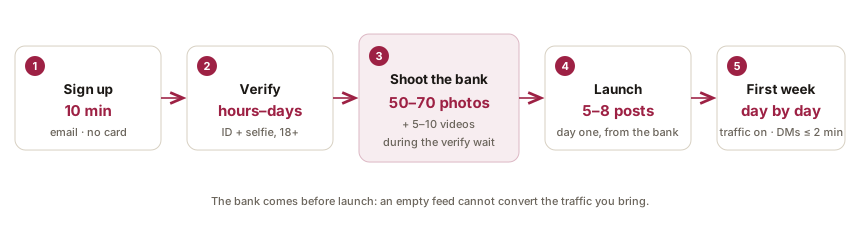
Signup itself is email, password, name — about 10 minutes, no card. Earning requires the creator application on top: identity verification at 18+, payout details, and tax information. In order:
- 1. Register the account — email and password, confirm the email. At this point you have a fan account, not a creator account.
- 2. Open the creator application — the "become a creator" flow in settings. This is where the platform asks for everything below.
- 3. Add payout details — your own bank account or payout method, in your own name. If the names do not match, expect a rejection.
- 4. Fill the tax form — the platform collects a tax form as part of onboarding; your payouts report to your own tax residence, which for our models usually means Ukraine or Kazakhstan rules apply.
- 5. Upload ID and a selfie holding it — to the platform only, through the verification form. Both sides of the document, edges uncropped.
- 6. Wait for review — hours to a few days. Use the wait to shoot: the launch bank takes 1–2 days anyway.
Source: OnlyFans Help Centre,Fenix International Limited — 2026-08-21
One hard rule across all six steps: documents go to the platform only. An "agency" or "manager" asking for your passport in DMs is the single most common scam in this niche — a real agency needs 0 of your documents, and what agencies actually do never includes holding your ID.
Why verifications get rejected — and the fix
| Rejection reason | What went wrong | The fix |
|---|---|---|
| Unreadable document | Glare, blur, or a photo of a photo | Daylight, matte surface, shoot straight-on, no flash |
| Cropped edges | Part of the document outside the frame | All four corners visible, nothing covered by fingers |
| Name mismatch | Payout details in a different name than the ID | Payout method in your own legal name, stage name stays public-facing only |
| Selfie doesn’t match | Heavy filters, low light, face obscured | Neutral light, no filters, document readable in the same frame |
| Age cannot be confirmed | Expired or juvenile-issued document | A current government ID with birth date; the platform verifies 18+ against it |
A rejection is not a ban: fix the reason and resubmit. Two clean shots of the document in daylight prevent most of the table.
Profile that converts
- Username: pronounceable, spellable from hearing, no years or digits that will age, not your real name.
- Bio, three parts: who you are (a persona, not a passport), what a subscriber gets (content type and cadence), one action to take.
- Avatar: readable as a thumbnail — one subject, close crop, no text; it renders smaller than a coin in DMs and comments.
- Banner: shoot horizontal with the subject centered — the platform crops the edges differently across devices, so nothing important lives near the borders.
- Both images stay within the platform’s content rules even for a free page: the profile is visible before any paywall.
Source: OnlyFans Terms of Service,Fenix International Limited — 2026-08-20
Pricing: paid page, free page, and what PPV changes
The platform allows subscriptions from $4.99 to $49.99 a month and takes 20% of every transaction — subscriptions, PPV unlocks, tips, all of it. The pricing decision is not "what is my content worth"; it is which of two machines you are building.
The two machines, with the math
Paid page: 100 subscribers at $9.99 is $999 of predictable monthly turnover before DM sales — but every subscriber had to pass a paywall cold, and cold traffic converts to paid follows in low single-digit percents. Free page: the same traffic follows at ten times the rate, the feed becomes a shop window, and revenue happens in DMs — PPV unlocks and customs priced per item. On cold social traffic the free machine almost always wins the first months: more people inside, more conversations, and DM sales are uncapped while a subscription price is fixed. How the revenue actually splits is its own page.
PPV pricing without a table of magic numbers
- PPV is priced per item, and the working anchor is the subscription: an unlock priced far below the monthly sub reads as spam, one priced at several times the sub needs real preview work to sell.
- The preview sells the unlock: the locked message needs a reason to open it — a specific promise, not "new video 🔥".
- Customs are quoted individually and always upfront — price agreed, then produced, never the reverse.
- Raise prices on evidence, not hope: when unlocks sell through consistently, the next batch can cost more. Pricing down mid-conversation trains subscribers to wait you out.
Bundles, promotions, and the second page
Discounted multi-month bundles trade revenue for retention — useful once renewal data exists, noise before it. Free-trial links are a traffic tool for the paid page: a expiring trial converts warm followers without permanently opening the gate. And the mature setup in this niche is both machines at once: a free page as the funnel and a paid page as the back room — which is why working models end up at 2–3 pages, and why running that at scale is a team sport.
The content bank: 50–70 photos before launch
This is the step that separates pages that ramp from pages that stall, and it is the one most guides skip. Before launch, shoot 50–70 photos and 5–10 videos. Photos fill the feed; videos feed PPV — the two are different work and are counted separately.
The reasoning is mechanical. A subscriber who lands on a five-post page unsubscribes within the month. A launch without a bank means shooting in a panic while the first traffic you paid for in time and effort bounces off an empty feed. One or two shoot days first, then launch — not the other way around.
What the bank is made of
- Feed posts — the majority of the 50–70: varied outfits and sets so the first weeks of feed don’t look like one afternoon.
- Story material — casual, low-production frames and clips; stories burn 1+ a day, so the bank needs a stack of them.
- PPV material — the 5–10 videos: produced for DMs, never posted to the feed, each with a preview frame that sells the unlock.
- Profile assets — avatar, banner, and the pinned first post that tells a new subscriber what this page is.
One shoot day, run like a checklist
- Plan 4–6 outfit changes and 2–3 sets (corners of a room count as sets if the light differs) — variety in the bank comes from planning, not from shooting longer.
- Shoot photos in bursts and select later; the day produces 50–70 usable frames only if you shoot several times that.
- Batch the stories in the same day: short clips between setups, casual frames — future you will thank present you daily.
- Check every frame against the anonymity list before it leaves the phone: tattoos, windows, interiors, documents, parcels with addresses.
Phone production: light, background, sound
- Light: face the window, never sit against it — daylight beats any ring light beats overhead bulbs. Golden rule: if you squint reading your phone, the light is wrong.
- Background: one plain wall or fabric beats a lived-in room — less to recognise you by, and the frame ages better (the faceless framing rules apply to everyone).
- Sound, for video: a quiet room matters more than the microphone; echo and street noise mark a video as amateur faster than resolution does.
- Camera: the phone’s main lens, wiped clean, at arm’s length or on a $20 tripod — equipment is not what separates earning pages from stalled ones.
After launch: the minimum cadence
At least 2 posts a week and 1 story a day. Stories carry as much weight as posts: they show the person behind the page is alive and reachable today, and that feeling is what renews subscriptions. A ten-post burst followed by two silent weeks performs worse than a steady trickle.
The first week, day by day
The launch week is scheduling work, not creative work — everything it needs was produced before it started. This is the plan we run pages through:
| Day | What happens | Why |
|---|---|---|
| Day 1 | Publish the profile: avatar, banner, bio, pinned welcome post, 5–8 feed posts from the bank | A first visitor must land on a page that looks alive, not on a countdown |
| Day 2 | First stories; traffic accounts start pointing at the page | Stories mark the page as active from day one |
| Day 3 | Posting cadence begins: feed post + story; first DM replies within 2 minutes | Reply speed is trained as a habit now, while volume is low |
| Day 4 | First mass DM to early subscribers with a PPV unlock | The DM channel starts earning before the audience is big |
| Day 5 | Review traffic: which source brought subscribers who actually message | Sources that bring silent subscribers get less effort next week |
| Day 6 | Restock check: count remaining bank against the week’s burn rate | The bank empties faster than intuition says; the next shoot day gets scheduled here |
| Day 7 | Week one numbers: subscribers, DM revenue, unlock rate | Decisions from here run on the page’s numbers, not on feelings |
Nothing in the table requires talent; all of it requires hours at specific times of day. That is the honest reason managed pages exist — and if you run solo, the table is still the job description.
The first month: traffic and messaging
The platform brings no organic traffic — zero. Every subscriber is brought from outside: Reddit communities, X, TikTok and Instagram by implication, all funnelled through a landing layer into your page. Promotion takes more ongoing time than shooting, and the answer to "how many followers do I need to start" is 0 — the full breakdown is here.
Messaging is the revenue engine from day one: on working pages DM sales out-earn subscriptions, and reply speed moves revenue more than reply content — the target is 2 minutes. That is also why a page cannot be covered by one person at scale: subscribers write around the clock, and covered pages run 2–3 chatters in shifts. What the numbers look like when the system works — real income bands, by percentile.
What stalls new pages
- Launching with 5 photos and "seeing how it goes" — the feed cannot convert.
- Buying followers: bots do not buy PPV, and a dead audience hides what works.
- Answering DMs "when convenient" — the buying window closes in minutes.
- Accepting off-platform payment offers — the fastest route to a ban.
- Paying anyone upfront for "promotion" or "training": the norm is 0.
- Reading one viral income screenshot and planning around it — the honest math comes first.
Frequently asked questions
- How do I start an OnlyFans account?
- Signup takes about 10 minutes (email, password — no card), then ID verification at 18+ which runs from hours to a few days. The step that determines success comes before launch: a content bank of 50–70 photos and 5–10 videos.
- How much content do I need to start an OnlyFans?
- 50–70 photos and 5–10 videos before launch — photos fill the feed, videos feed PPV sales. After launch the minimum cadence is 2 posts a week and 1 story a day.
- Should I start with a paid or free page?
- With cold traffic, a free page usually wins: entry is open and revenue happens in DMs, where sales are uncapped. With an existing warm audience, paid works — the platform allows $4.99–49.99/mo. Working models typically end up running 2–3 pages.
- How long does OnlyFans verification take?
- From a few hours to a few days: automated checks with manual review, so timings vary. Use the wait to shoot the launch bank — 50–70 photos — rather than losing the time twice.
- Can I use a stage name on OnlyFans?
- Yes — the public name, username and persona are yours to invent, and for anonymity they should never match your real name or other social handles. The legal name exists in exactly 2 places: the identity verification and the payout details, neither of which subscribers see.
- Do I need an LLC or business account to start an OnlyFans?
- No — the platform onboards you as an individual with exactly 3 things: personal ID, personal payout details, and a tax form. Registering a business becomes a question later, driven by your country’s tax rules on foreign income, not by the platform.
- How much does it cost to start an OnlyFans?
- The platform charges $0 to register and takes 20% of earnings; the real cost is production time — 1–2 shoot days for the launch bank. Anyone charging upfront for "training" or a "roster spot" is running a scam: the norm is 0.
- What equipment do I need to start?
- A phone with a clean lens, a window, and optionally a $20 tripod — that covers the launch bank of 50–70 photos. Light and a quiet room move quality more than any camera upgrade; equipment is never what separates earning pages from stalled ones.
- Can I start an OnlyFans without showing my face?
- Yes — faceless is a working format with the same launch bank of 50–70 photos. Framing shifts to body and texture, and everything identifying leaves the frame: tattoos, scars, recognizable interiors. Backgrounds identify as reliably as faces.
Thinking about working with an agency?
Read our terms in full before you talk to anyone — ours or someone else’s.